S91 Top Up
S91 Top Up allows users to add funds to their platform balance through supported payment methods including FPX, DuitNow QR and Touch ’n Go. Choose a preset amount or enter a custom amount, select your preferred payment option and follow the displayed payment instructions to complete the transaction.
How to Top Up on S91
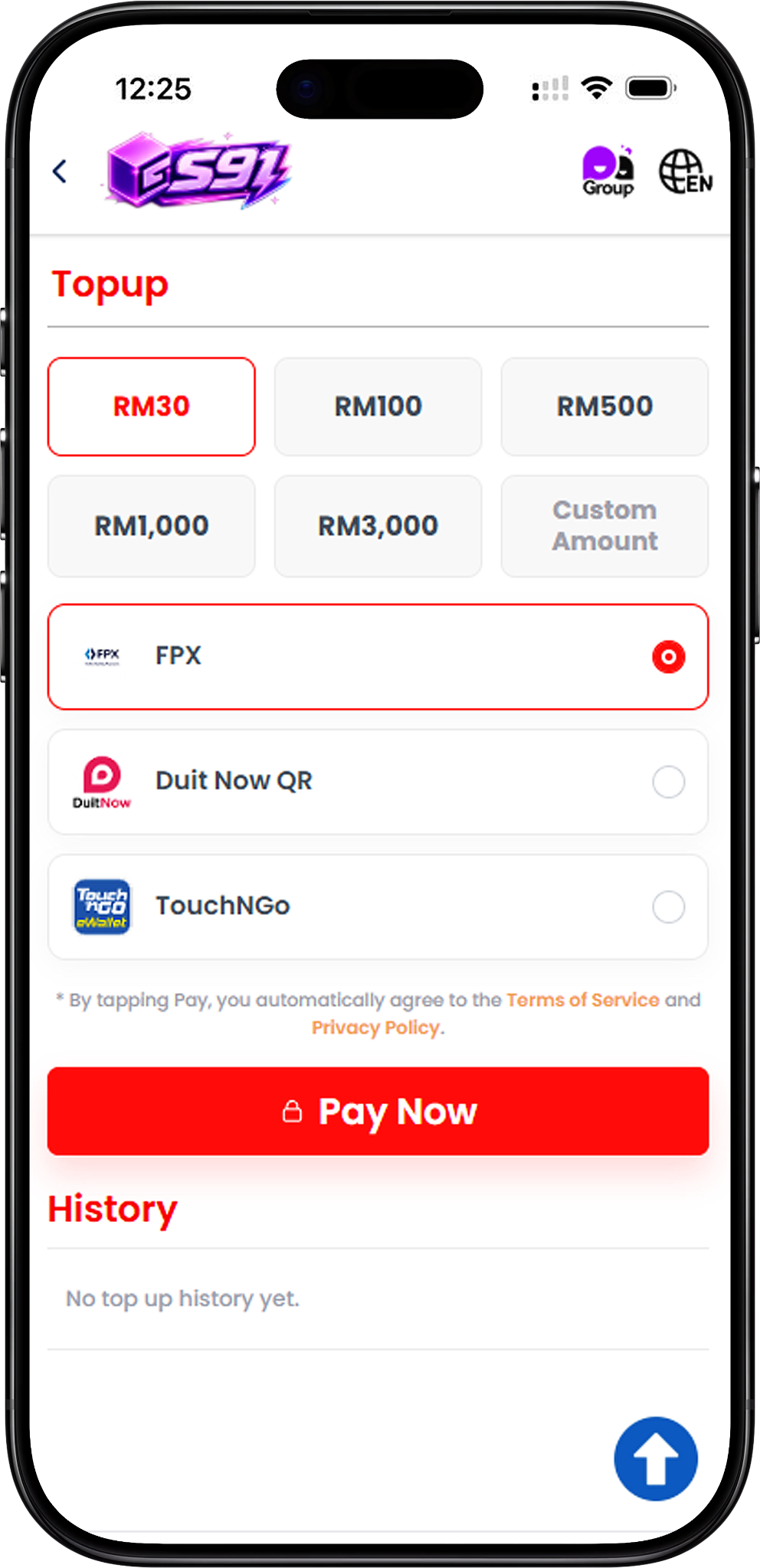
Step 1: Choose Your Top Up Amount
Open the S91 Top Up page and select RM30, RM100, RM500, RM1,000 or RM3,000. You can also select Custom Amount when you want to enter a different top-up value.
Step 2: Select a Payment Method
Choose one of the available payment options displayed on the Top Up page. S91 supports FPX, DuitNow QR and Touch ’n Go for the payment flow shown.
Step 3: Select Pay Now
After confirming the amount and payment method, select Pay Now to continue. By proceeding with payment, users agree to the applicable Terms of Service and Privacy Policy displayed on the Top Up page.
Step 4: Complete the Payment
Follow the instructions provided by the selected payment channel. The exact payment screen and required steps depend on whether you choose FPX, DuitNow QR or Touch ’n Go.
S91 Top Up with FPX
Step 1: Select FPX
Choose your preferred top-up amount, select FPX as the payment method and tap Pay Now to proceed to the payment page.
Step 2: Choose an Online Banking Option
The FPX payment page displays supported online banking options such as Maybank, RHB Bank, Public Bank, AmBank, Hong Leong Bank, CIMB Bank, Affin Bank and Bank Simpanan Nasional. Select the available bank you want to use.
Step 3: Complete Bank Authorization
Continue through the payment provider’s login and authorization process for the selected bank. Make sure your bank account is enabled for online payment processing and avoid submitting the payment more than once.
Step 4: Check the Payment Result
Complete the authorization and wait for the payment result. Keep the displayed reference number available in case you need to contact S91 Customer Service regarding the transaction.
S91 Top Up with DuitNow QR
Step 1: Select DuitNow QR
Choose the required top-up amount, select DuitNow QR and tap Pay Now. A DuitNow QR payment page will be generated with the order amount and transaction reference number.
Step 2: Scan the DuitNow QR Code
Use a supported payment app to scan the generated DuitNow QR code and verify that the payment amount matches the order amount shown on the page.
Step 3: Complete Payment Before the QR Expires
Complete the payment while the generated QR code remains valid. The payment page displays an expiry countdown for the current QR order.
Step 4: Do Not Reuse an Expired or Completed QR
The generated QR code should only be scanned and paid once. Do not reuse it, refresh or go back during the payment process, and do not proceed if the QR code or order has expired.
S91 Top Up with Touch ’n Go
Step 1: Select Touch ’n Go
On the S91 Top Up page, choose the amount you want to add, select Touch ’n Go as the payment method and tap Pay Now.
Step 2: Choose Touch ’n Go as the E-Wallet
On the payment page, select E-Wallet and choose Touch ’n Go from the available e-wallet selection. The transaction page displays the amount, order ID and S91 as the payment recipient.
Step 3: Confirm the Payment Amount
Review the MYR payment amount shown on the payment page before continuing. Confirm that it matches the S91 Top Up amount you selected.
Step 4: Complete the Touch ’n Go Payment
Select the payment button and follow the Touch ’n Go payment process presented by the payment provider to complete your top up.
Check Your Top Up History
Review Previous Top Up Activity
The History section on the S91 Top Up page is provided for reviewing available top-up records. If no previous transaction is recorded, the page displays “No top up history yet.”
S91 Top Up Frequently Asked Questions
What payment methods are available for S91 Top Up?
The S91 Top Up page provides FPX, DuitNow QR and Touch ’n Go as supported payment options.
What top-up amounts can I select?
The displayed preset amounts are RM30, RM100, RM500, RM1,000 and RM3,000. A Custom Amount option is also available.
Can I use online banking for S91 Top Up?
Yes. FPX provides access to supported online banking options displayed by the payment provider, including several Malaysian banks.
Can I top up S91 with DuitNow QR?
Yes. Select DuitNow QR as your payment method and follow the generated QR payment instructions. The QR should be used only once and before its displayed expiry time.
Can I use Touch ’n Go to top up S91?
Yes. Touch ’n Go is available as a payment option. After proceeding to the payment provider, select Touch ’n Go under the available E-Wallet option and complete the payment.
Where can I find my FPX transaction reference number?
The FPX payment page displays a Reference No. together with the transaction amount and time. Keep this number available if you need assistance with the transaction.
What should I do if my DuitNow QR expires?
Do not proceed with payment using an expired QR code or order. Return to S91 and start the required top-up payment process again.
Where can I check my previous top ups?
Check the History section on the S91 Top Up page for available records of your previous top-up activity.
Top Up Your S91 Balance
Choose your preferred amount and complete your S91 Top Up using FPX, DuitNow QR or Touch ’n Go.